
How to cancel a subscription without waiting on hold
Let RaimCalls call the company for you. Your AI works the phone menu, waits on hold and brings back a confirmation number, and you never hear the hold music.

For Android phones and tablets. The iPhone and iPad version isn’t on the App Store yet.
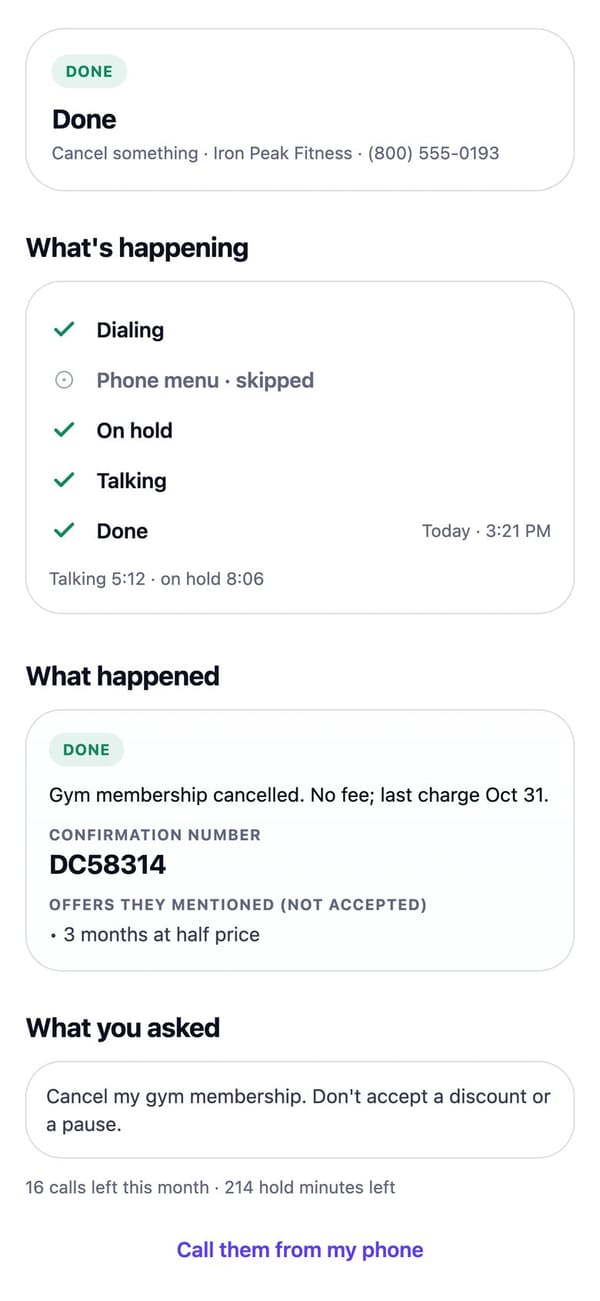
Real RaimCalls screens with a made-up sample business. Your screens show your own business, and layouts can differ slightly between app versions.
Step by step
Steps
Open Call for me
On the Calls tab tap Call for me (or open Settings, then Call for me), then tap New call.
Who to call
Choose A business. Add the company’s name and phone number: type it, tap Pick from my contacts, or tap Find their number to search the web. Every number found shows the page it came from, so check it’s the company’s own customer-service line.
What to get done
Choose Cancel something and say exactly what to cancel, for example: “Cancel my internet plan, account under my business name.”
What the AI may share
Add only the details it may share for this call, like the account email, billing ZIP or account number. RaimCalls shows what that company usually asks for. It never gives passwords, PINs or full card numbers.
Bring you in
Optionally turn on Bring me in if they need me and add your number, and set the Longest wait on hold. Banks, card companies, insurers and mobile carriers usually need to check who you are, so keep this on for them.
Check and start
Tap Practice first to run a pretend call where nothing is dialed, then Start the call. Or choose Later and pick a time, or When they open.
Let it work
Your AI says it’s an AI calling for you, works the phone menu and waits on hold. You can tap Join the call or Hang up at any time.
Get the result
You get a summary, any confirmation number and the transcript. Share a call receipt as a PDF, or tap Draft an email about this to send the confirmation from your own mail app.
Tip: if the bill is in Bills & subscriptions, tap Cancel this, or Cancel it in Bill Saver, to open Call for me already filled in. Removing a bill from your list doesn’t cancel it with the company.
It never agrees to pay, buy or sign up for anything: it brings offers back to you. Each call uses one of your plan’s AI outbound calls plus its minutes and hold time. Cancelling a RaimCalls plan itself is done where you bought it: your App Store or Google Play subscriptions, or Manage billing on raimcalls.com/account.
FAQ
Related questions
What is Call for me?
Your AI phones a company for you: to cancel a plan, chase an order, book or move an appointment, or ask a question. You choose the number, say what you need and add only the details it may share. It says at the start that it's an AI calling for you, waits on hold, and when it's done you get a summary, any confirmation number and the transcript.
What will Call for me never do?
It never pretends to be you, never calls personal mobile numbers, and never agrees to pay, buy or sign up for anything: it brings offers back to you. It never gives passwords, PINs or full card numbers, only the details you added for that call. It hangs up when the hold limit you set is reached.
Can I join the call?
Yes. Turn on Bring me in if they need me and add your number. If the company needs to speak to you, your phone rings and you join. While a call is running you can also tap Join the call or Hang up.
Can my AI call later, or when they open?
Yes. Choose Later and pick a day and time, or When they open. It only ever calls between 8 am and 9 pm where they are, and you get a notification when the call starts and when it ends. Until then you can change the time, call now instead, or cancel.
What if they're busy, don't answer or are closed?
Choose how many times to try again, from none to three (two is the default). Each try is a new call on your plan, it stops and tells you if your plan's calls run out, and every try is listed on the call.
Can it call a few businesses and compare them?
Yes: Call for me › Call around. Say what you need once and pick 2 to 5 businesses. Your AI calls up to 3 at a time, asks each the same questions and lines up the answers side by side. Tap Book this one to start a booking call when you're ready.
How does RaimCalls know how long I'll be on hold?
It's learned from RaimCalls' own calls to that company's number, kept only as totals for the number. It appears only after at least 5 calls from different accounts reached that number, and only for company lines.
Can it call one of my clients?
Yes, with their consent. Choose A person to have your AI book, move or confirm an appointment with a client who agreed to AI calls from you. It calls only between 8 am and 9 pm their time, and never again if they say stop.

The future picks up.
Get RaimCalls
Let your AI take the calls you'd rather not make, while your business line, your admin and your people stay one tap away.
For Android phones and tablets. The iPhone and iPad version isn’t on the App Store yet.
Plans from $9.99 a month. Answering an app call is always free. See plans and pricing.